In-Dash Video Question(s)!


Thread Starter
|
Member
Joined: Jul 2005
Posts: 1,902
Likes: 2
From: Sask, Canada

In-Dash Video Question(s)!
Hey guys, I have a 94' with Infinity Reference 6.5" all around. My Panasonic CQ 5301U MP3/CD player crapped out about 1 week after my 1-year warranty and have been listening to my iPod or Sirius since. I want to upgrade to something with a screen and GPS Navi (I don't care about BlueTooth), but have heard no-so-great things about motorized units (being the 94' dash is single DIN).
I have three questions:
1) Mounting one in an Explorer console, just below the HVAC controls would be my first option, would this be too low to take full advantage of the GPS and DVD player?
2) Does anyone have an opinion on the Pioneer 5.8" In-Dash Multimedia Player With GPS Navigation System (AVIC-F700BT) unit?
3) Any idea how much lack of heater or A/C functionality I would loose by removing the top center vent in a 94' dash to expand my player to a double DIN size?
Thanks guys.
I have three questions:
1) Mounting one in an Explorer console, just below the HVAC controls would be my first option, would this be too low to take full advantage of the GPS and DVD player?
2) Does anyone have an opinion on the Pioneer 5.8" In-Dash Multimedia Player With GPS Navigation System (AVIC-F700BT) unit?
3) Any idea how much lack of heater or A/C functionality I would loose by removing the top center vent in a 94' dash to expand my player to a double DIN size?
Thanks guys.
Member

Joined: Jan 2008
Posts: 1,037
Likes: 1
From: Zephyrhills, FLorida
On rps, someone was asking about this, and someone had an idea of take an inch or two out the center vent, and put a piece of billet there so it looks clean.
You wouldnt loose any air, it would just be pushed out of the other vents.
You wouldnt loose any air, it would just be pushed out of the other vents.

Thread Starter
|
Member
Joined: Jul 2005
Posts: 1,902
Likes: 2
From: Sask, Canada
I'll go out and just play around with some ideas to conjure up.
Thread Starter
|
Member
Joined: Jul 2005
Posts: 1,902
Likes: 2
From: Sask, Canada
I spent some time testing locations and to be honest the stock player location is by far the most convenient and practical. Anywhere else is just too low to be "safe" or easily accessible. I quickly Photoshopped my idea of location and the top vent solution:


Seems to interfere with other items the least of all positions but will require the most "appealing" or noticeable fabrication and modification. Any ideas or thoughts are gladly welcome!
Seems to interfere with other items the least of all positions but will require the most "appealing" or noticeable fabrication and modification. Any ideas or thoughts are gladly welcome!



Member
Joined: Jun 2004
Posts: 4,659
Likes: 0
From: Navasota, Texas
I read bad things about the radio, i have the older one
i wanted to get that one but it so much for the customer reviews...
http://www.amazon.com/Pioneer-AVIC-F.../dp/B001ANZCMW
i wanted to get that one but it so much for the customer reviews...
http://www.amazon.com/Pioneer-AVIC-F.../dp/B001ANZCMW
Member
Joined: Jan 2008
Posts: 1,037
Likes: 1
From: Zephyrhills, FLorida
That looks good, Exactly what i was thinking. Flip out doesn't work with this dash very well anyhow, The top right corner still hits the dash so the screen doesn't go back all the way, that's why I sold mine.
I say go for it!
I say go for it!
Thread Starter
|
Member
Joined: Jul 2005
Posts: 1,902
Likes: 2
From: Sask, Canada
I got the unit (AVIC F700BT) this morning for a sweet price brand new (got to love Boxing Day sales). I'm pulling the dash trim off today and bustin' out the plastic repair & fiberglass, I'll take a good amount of pictures and detail if anyone else wants to attempt this.

Thread Starter
|
Member
Joined: Jul 2005
Posts: 1,902
Likes: 2
From: Sask, Canada
I don't want to make a Project Log for something like this so I'll post up the gradual progress in here.
I picked up a cheap small dremel and some bits because I couldn't find my nice Dremel brand unit, and I believe it would be to big to for this work.

How the OEM single-DIN opening is/was:

A rough cut to work out some measurements and final unit placement (I want to keep the tab/clip on the upper right):

The size of the face to show the room needed:

The stock dash workings:

Slightly opened up to expose that pesky vent I'm going to attempt to massage into shape tomorrow:

More progress tomorrow, I'm hoping by making this documentation I'll have more enthusiasm to get it done, thanks guys.
I picked up a cheap small dremel and some bits because I couldn't find my nice Dremel brand unit, and I believe it would be to big to for this work.
How the OEM single-DIN opening is/was:
A rough cut to work out some measurements and final unit placement (I want to keep the tab/clip on the upper right):
The size of the face to show the room needed:
The stock dash workings:
Slightly opened up to expose that pesky vent I'm going to attempt to massage into shape tomorrow:
More progress tomorrow, I'm hoping by making this documentation I'll have more enthusiasm to get it done, thanks guys.

Thread Starter
|
Member
Joined: Jul 2005
Posts: 1,902
Likes: 2
From: Sask, Canada
MOTOunplugged - thanks!
From this:

To this:

With Bezel installed, to check out positioning and clearances. A slight shift to the right to center the unit will be close to the final position:


Without Bezel, here is where it'll attach on each side, the plastic "tab" hanging above the unit, and a hanger/pin in the rear for stability:

Progress is a little slow from doing this in a non-heated garage (about 25*F), and my primary distraction:

From this:
To this:
With Bezel installed, to check out positioning and clearances. A slight shift to the right to center the unit will be close to the final position:
Without Bezel, here is where it'll attach on each side, the plastic "tab" hanging above the unit, and a hanger/pin in the rear for stability:
Progress is a little slow from doing this in a non-heated garage (about 25*F), and my primary distraction:
Last edited by sniper_101; Jan 10, 2009 at 08:15 PM.

dont mind the ghetto orange switch. its gone now and the dash has been resanded bondod and painted. ill get a new pic this weekend, i did it about 4 years ago. but im ditchin it soon goin back to stock shroud and a double din

Thread Starter
|
Member
Joined: Jul 2005
Posts: 1,902
Likes: 2
From: Sask, Canada
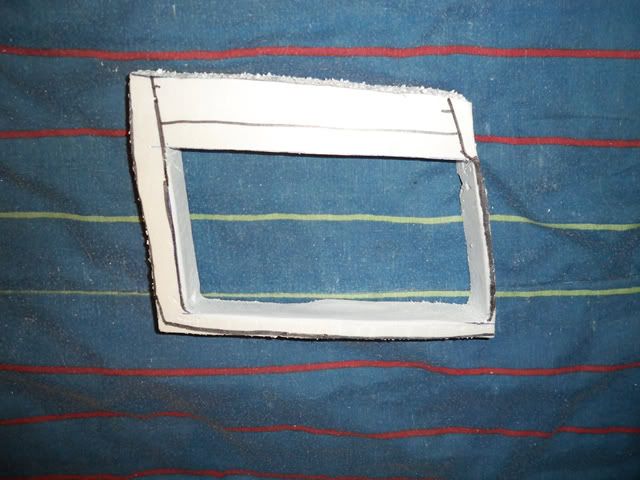
Just using some plastic sheets to seal up the bottom with some heat/sound deadener in between to prevent the unit from over heating. I'm going to trim the actual vent down about 1/2" to maintain it's function and I'm going to leave the left half clear for a little something later on.
I made a little progress this week, mainly finishing up some "hacks" in the unit and gather materials for fiberglassing and mounting material. I will be using insulating foam to make the contours and then use it to create a mold which I'll use to form the final fiberglass piece.
Finishing a few little file changes in Testmode (this is why I wanted the AVIC over Kenwood, the amount of changes you can make in comparison):

Starting shaping, this and the cast should be done by Saturday:

Unfortunately/fortunately my body shop has room for my truck early so I may have to leave actually mounting the unit until it is done, another reason to hustle I guess.
I made a little progress this week, mainly finishing up some "hacks" in the unit and gather materials for fiberglassing and mounting material. I will be using insulating foam to make the contours and then use it to create a mold which I'll use to form the final fiberglass piece.
Finishing a few little file changes in Testmode (this is why I wanted the AVIC over Kenwood, the amount of changes you can make in comparison):
Starting shaping, this and the cast should be done by Saturday:
Unfortunately/fortunately my body shop has room for my truck early so I may have to leave actually mounting the unit until it is done, another reason to hustle I guess.

Member
Joined: Oct 2005
Posts: 2,549
Likes: 1
From: Lehigh Acres, FL
What hacks did you do?
I have a avic-900 and really want to do the hack were you and make the arrow on the gps a pic of your truck and have night ryders voice for the navi voice but i am not that good with computer stuff and would mess it up some how.
I have a avic-900 and really want to do the hack were you and make the arrow on the gps a pic of your truck and have night ryders voice for the navi voice but i am not that good with computer stuff and would mess it up some how.
Thread Starter
|
Member
Joined: Jul 2005
Posts: 1,902
Likes: 2
From: Sask, Canada
I've done the Software Speed Bypass (and the hardware on my mom's F700BT),
Add a Stop Navigate button to the compass,
Add a vehicle image to arrow,
Add Voice Guidance Mute Button,
Key Beep Removal,
Changed Icons (changed back to original now),
Changed background (also changed back now),
KITT Backsplash (not really a mod),
Increased the RAM size,
and of course the Firmware 2.0 upgrade.
http://www.avic411.com/forum/viewtopic.php?t=18327
I'm working with a local friend nicknamed "Bill Gates" to make a software program with touch-screen buttons/keypad to control the remote turn on lead to act as a ignition lock.
If you need any assistance I'd be glad to try and help. Once you do your first "hack" everything else is a breeze if you have any computer knowledge.
Add a Stop Navigate button to the compass,
Add a vehicle image to arrow,
Add Voice Guidance Mute Button,
Key Beep Removal,
Changed Icons (changed back to original now),
Changed background (also changed back now),
KITT Backsplash (not really a mod),
Increased the RAM size,
and of course the Firmware 2.0 upgrade.
http://www.avic411.com/forum/viewtopic.php?t=18327
I'm working with a local friend nicknamed "Bill Gates" to make a software program with touch-screen buttons/keypad to control the remote turn on lead to act as a ignition lock.
If you need any assistance I'd be glad to try and help. Once you do your first "hack" everything else is a breeze if you have any computer knowledge.
Thread Starter
|
Member
Joined: Jul 2005
Posts: 1,902
Likes: 2
From: Sask, Canada
I'll post progress tomorrow, I had to order my fiberglass material/resin/fiber special so I started again today. I have the bottom of the vent sealed up and have been working on the actual vent outlet.
Ray_Welder - lol thanks for the motivation, I'll be taking full advantage of the decent weather we're to get this week to get it done.
As Robin Hood said, they run off Windows (ME I believe), all you need is the testfile on the SD card to get into the files, making it able to do file hacks and file copies (like the software speed bypass). The ignition lock would use an on-screen number pad to allow the engine to start, you enter it wrong and my alarm will go off. I'm not sure if it'll work or be practical but if he can finish the software I'll give it a try.
Sorry for the delayed response, I completely forgot about this thread. More to come!
Ray_Welder - lol thanks for the motivation, I'll be taking full advantage of the decent weather we're to get this week to get it done.
As Robin Hood said, they run off Windows (ME I believe), all you need is the testfile on the SD card to get into the files, making it able to do file hacks and file copies (like the software speed bypass). The ignition lock would use an on-screen number pad to allow the engine to start, you enter it wrong and my alarm will go off. I'm not sure if it'll work or be practical but if he can finish the software I'll give it a try.
Sorry for the delayed response, I completely forgot about this thread. More to come!