General Technical & Electrical General technical and electrical discussion for the Ford Ranger that does not fit in any other sub-forum.

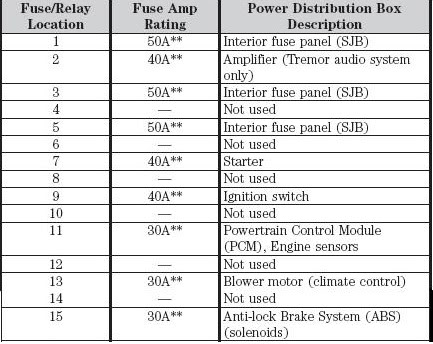
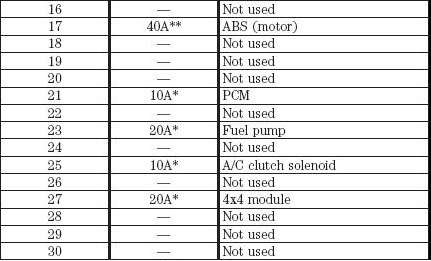
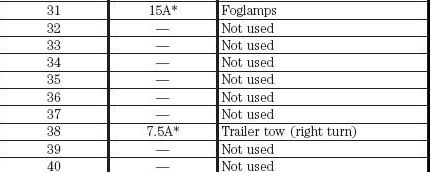
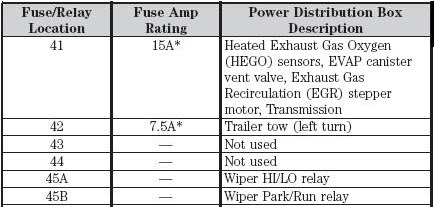
Fuse Diagram Need to replace Link Port/Data Port Fuse

Thread Tools
 
Search this Thread
 
Old May 25, 2009
  #1  
FRXLT's Avatar
Thread Starter
|
Member
iTrader: (6)
Joined: Mar 2008
Posts: 822
Likes: 1
From: San Jose, CA
Fuse Diagram Need to replace Link Port/Data Port Fuse

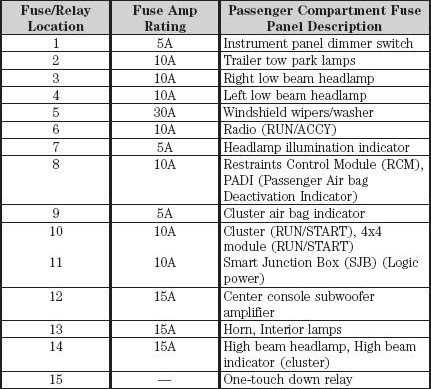
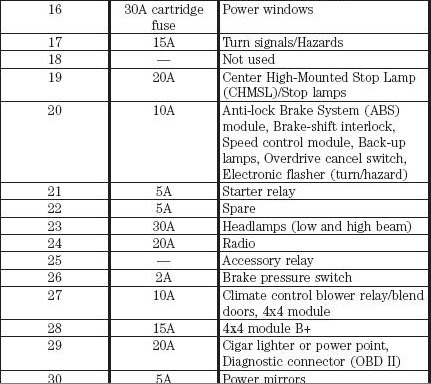
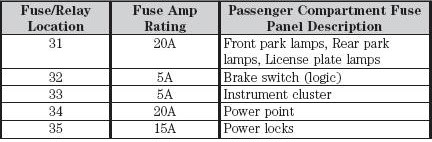
Ok so my Chilton's book dose not have a fuse diagram for my truck and I need to replace some fuses. My Data Port is not working, and other misc interior lights don't work. Can anyone post up a pic of a Fuse diagram So I can see the layout of what fuse will go to what. This is for a 2004 Ford Ranger XLT 3.0L 2wd in case that info was needed.

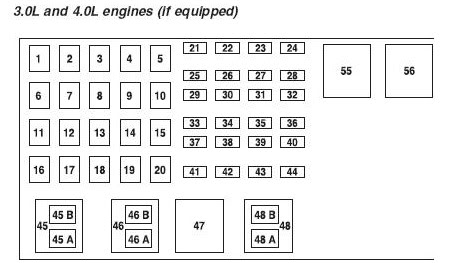
BTW: Both the Engine bay fuse box and the fuse box on the right passenger side kickpanel diagrams will do. Thanks.

 
Reply
Old May 25, 2009
  #2  
RangerNDog's Avatar
Member
iTrader: (10)
Joined: Aug 2008
Posts: 1,958
Likes: 2
From: Harrisonburg, VA
Im pretty sure its in your owners manual.
 
Reply
Old May 25, 2009
  #3  
RangerNDog's Avatar
Member
iTrader: (10)
Joined: Aug 2008
Posts: 1,958
Likes: 2
From: Harrisonburg, VA
Click here and it starts on page 136
 
Reply
Old May 25, 2009
  #4  
FRXLT's Avatar
Thread Starter
|
Member
iTrader: (6)
Joined: Mar 2008
Posts: 822
Likes: 1
From: San Jose, CA
My truck didn't come with the original owners manual. I ordered the Ford Factory Electrical and Technical books off of Trent but still waiting. Just wondering if someone on here had those books on hand. Or a diagram they could post up.

Also the link dose not work.
 
Reply
Old May 25, 2009
  #5  
RangerNDog's Avatar
Member
iTrader: (10)
Joined: Aug 2008
Posts: 1,958
Likes: 2
From: Harrisonburg, VA
the link is a pdf and you have to let it download. its about 2.5mb file.
 
Reply
Old May 25, 2009
  #6  
04blackedge's Avatar
RF Veteran
iTrader: (13)
Joined: Jan 2007
Posts: 23,426
Likes: 8
From: Durham, NC
Hey man, the books are going out tomorrow. Sorry about the delay, I have them all boxed up and ready to go
 
Reply
Old May 25, 2009
  #7  
FRXLT's Avatar
Thread Starter
|
Member
iTrader: (6)
Joined: Mar 2008
Posts: 822
Likes: 1
From: San Jose, CA
Originally Posted by RangerNDog
the link is a pdf and you have to let it download. its about 2.5mb file.
Ok I'll try it again.


Originally Posted by 04blackedge
Hey man, the books are going out tomorrow. Sorry about the delay, I have them all boxed up and ready to go
No problem at all man. We all have lives out side of R/F.

I just requested this post cuz my truck is running like crap and my check engine light is on. I would like to try to figure this mess out ASAP. But first is to deal with the fuses and it will be easier to identify the fuse's and know what goes to what thanks for the help!
 
Reply
Old May 25, 2009
  #8  
FRXLT's Avatar
Thread Starter
|
Member
iTrader: (6)
Joined: Mar 2008
Posts: 822
Likes: 1
From: San Jose, CA
Well here is what the link is showing up as.
Name:  errorpage.jpg
Views: 18516
Size:  34.8 KB
 
Reply
Old May 25, 2009
  #9  
RangerNDog's Avatar
Member
iTrader: (10)
Joined: Aug 2008
Posts: 1,958
Likes: 2
From: Harrisonburg, VA
Go Here. Put in the year and make and select Owners Guide 3rd Printing and click view content. The fuse section starts on page 136. I dunno why the link was working for me and not you.
 
Reply
Old May 25, 2009
  #10  
Mykhael's Avatar
Member
iTrader: (3)
Joined: Sep 2004
Posts: 4,197
Likes: 2
From: .
Here is the PDF of the owners manual

Page 136 is the fuse section
 
Reply
Old May 25, 2009
  #11  
RangerNDog's Avatar
Member
iTrader: (10)
Joined: Aug 2008
Posts: 1,958
Likes: 2
From: Harrisonburg, VA
Originally Posted by STL
Here is the PDF of the owners manual

Page 136 is the fuse section
I tried to link that and he said it wouldn't work. Maybe I did something wrong.
 
Reply
Old May 25, 2009
  #12  
FRXLT's Avatar
Thread Starter
|
Member
iTrader: (6)
Joined: Mar 2008
Posts: 822
Likes: 1
From: San Jose, CA
Umm yea still won't work! lol I tried it on IE and still had the same page that said you needed to login.
 
Reply
Old May 25, 2009
  #13  
04blackedge's Avatar
RF Veteran
iTrader: (13)
Joined: Jan 2007
Posts: 23,426
Likes: 8
From: Durham, NC
Its on the same circuit as the left cigar lighter in the bezel. Mine was messed up too
 
Reply
Old May 25, 2009
  #14  
RangerNDog's Avatar
Member
iTrader: (10)
Joined: Aug 2008
Posts: 1,958
Likes: 2
From: Harrisonburg, VA
Go to http://www.motorcraftservice.com. On the left side go to owners guides and then put in the year and make and select Owners Guide 3rd Printing and click view content. The fuse section starts on page 136. Now lets hope this works. If for some reason it dosen't pm me your e-mail and i'll send you the pdf file.
 
Reply
Old May 25, 2009
  #15  
Mykhael's Avatar
Member
iTrader: (3)
Joined: Sep 2004
Posts: 4,197
Likes: 2
From: .
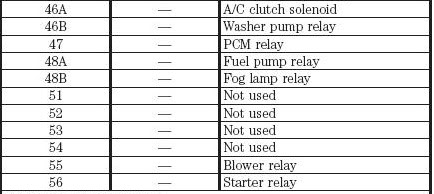
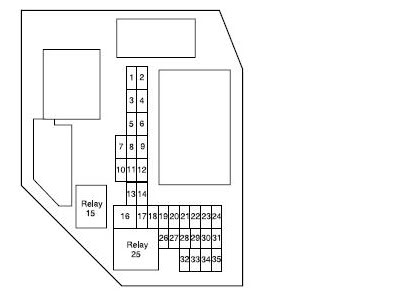
Here I copied it all for you hope this will help

Name:  fuse1.jpg
Views: 23790
Size:  13.0 KB
Name:  fuse2.jpg
Views: 21627
Size:  51.3 KB
Name:  fuse3.jpg
Views: 23509
Size:  46.8 KB
Name:  fuse4.jpg
Views: 18685
Size:  19.4 KB
Name:  fuse5.jpg
Views: 24977
Size:  26.7 KB
Name:  fuse6.jpg
Views: 20603
Size:  42.6 KB
Name:  fuse7.jpg
Views: 18902
Size:  25.6 KB
Name:  fuse8.jpg
Views: 18508
Size:  17.0 KB
Name:  fuse9.jpg
Views: 18595
Size:  26.8 KB
Name:  fuse10.jpg
Views: 18925
Size:  20.5 KB
 

Last edited by Mykhael; May 25, 2009 at 08:05 PM.
Reply
Related Topics
Thread
Thread Starter
Forum
Replies
Last Post
08hybridok
General Ford Ranger Discussion
3
Dec 31, 2013 04:02 PM
layin-body
General Technical & Electrical
4
May 18, 2010 09:46 PM
effexfour
Suspension Tech
9
Jan 9, 2010 11:27 PM
Free89BroncoII
Suspension Tech
21
Jul 1, 2008 08:43 AM
Rolldogg
General Technical & Electrical
7
Apr 14, 2007 10:15 AM


All times are GMT -6. The time now is 02:01 AM.