


Who is familiar with Excel?

Thread Starter
|
Member

Joined: Sep 2009
Posts: 294
Likes: 0
From: St. Louis, IL
Who is familiar with Excel?
I'm trying to create a spreadsheet for oil change and tire rotation. I'm trying to find the formula to add a given number to the mileage. For instance, I have the current mileage and I want to add a number amount to let me know the mileage at which I change it. Same for tire rotation
I want to add a given number to the black box that will automatically enter it in the red box
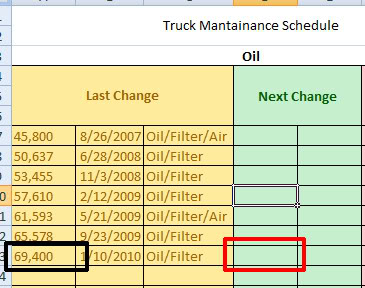
I want to add a given number to the black box that will automatically enter it in the red box



you gotta do a formula black box+X= red box (the cell numbers) and carry it down through all of the row.
so example, lets say black box is 21A (location) + your amount for milage (5k)= 21D or red box location.
so example, lets say black box is 21A (location) + your amount for milage (5k)= 21D or red box location.
Theres actually a easier way than copy and pasting. In the bottom right corner you can mouse over and you'll see a sort of plus sign appear. Click and drag that and it will copy the formula in each cell but with the correct cell number for the formula. So if you drag up it will say A12, A11, A10, etc, etc so you don't have to go back and change it.
You'll see what I mean if you try it, its kind of hard to explain.
You'll see what I mean if you try it, its kind of hard to explain.
Thread Starter
|
Member
Joined: Sep 2009
Posts: 294
Likes: 0
From: St. Louis, IL
Theres actually a easier way than copy and pasting. In the bottom right corner you can mouse over and you'll see a sort of plus sign appear. Click and drag that and it will copy the formula in each cell but with the correct cell number for the formula. So if you drag up it will say A12, A11, A10, etc, etc so you don't have to go back and change it.
You'll see what I mean if you try it, its kind of hard to explain.
You'll see what I mean if you try it, its kind of hard to explain.

Thread
Thread Starter
Forum
Replies
Last Post
rideac1
General Ford Ranger Discussion
13
Mar 3, 2006 12:20 PM


