


TippnOver's Merged Dash overlays / Photoshop request


Thread Starter
|
Member

Joined: Nov 2004
Posts: 2,664
Likes: 1
From: Danville, VA
#1 def! hit the nail on the head!
haha, yes, i'll be doing a how to....
now...is there any way to remove the white box...like...just have the letters and nothing else...to kinda make it look smoother?
haha, yes, i'll be doing a how to....
now...is there any way to remove the white box...like...just have the letters and nothing else...to kinda make it look smoother?

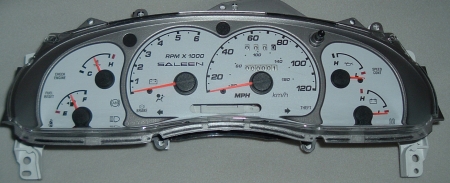


Thread Starter
|
Member
Joined: Nov 2004
Posts: 2,664
Likes: 1
From: Danville, VA
thats cool!
alright, now assuming someone can blend the color for me, when i install the print outs...do i have to take the black layer out and put the new one in its place....or cani just slide the new one over the old one?
alright, now assuming someone can blend the color for me, when i install the print outs...do i have to take the black layer out and put the new one in its place....or cani just slide the new one over the old one?


Member
Joined: Jul 2004
Posts: 1,671
Likes: 0
From: Mississippi
This is the best I can do with being as tired as I am

All of mine were done in Paint Shop Pro 9 I have Photoshop but don't like it at all this was my first attempt at something like this, so please criticize it with that in mind
All of mine were done in Paint Shop Pro 9 I have Photoshop but don't like it at all this was my first attempt at something like this, so please criticize it with that in mind


Hey Clay, I sorta know the pattern the colors have to be...What needs to happen is the white needs to be inverted to another color, then EVERY part that is a guage or needs to have light pass through it needs to be white. That is because obviously printers print white by not putting ink down, aka on the transparency sheets it wont be see through. Oh yeah, a few lights should be made visible, and turned yellow or orange color, i believe the printed orange color should be filter enough light to work as a warning light. Check engine and hte 4WD lights are both important.
Also TippenOver, for the image try to get Clay to put a fullsize image(kind of like the sunset, but something you enjoy better) and then take the mazdaspeed logo and make "mazdaspeed" a filled in black color, and off road can be red. As long as it doesn't mesh in with the picture background it should be easily readable.
Oh now that I think about it..for white guage faces..hmm..I really don't know how to do that, because using transparency paper you cannot print the color white. Do they sell a specialized "white" ink cartridge? I really cannot imagine how you'd pull that off, sorry.
Aaron
Also TippenOver, for the image try to get Clay to put a fullsize image(kind of like the sunset, but something you enjoy better) and then take the mazdaspeed logo and make "mazdaspeed" a filled in black color, and off road can be red. As long as it doesn't mesh in with the picture background it should be easily readable.
Oh now that I think about it..for white guage faces..hmm..I really don't know how to do that, because using transparency paper you cannot print the color white. Do they sell a specialized "white" ink cartridge? I really cannot imagine how you'd pull that off, sorry.
Aaron
Yeah but the back black gauge is just a black picture with white on the guage parts so light will come through. Then you match up the two sheets. About an overlay. Now that I think about it that seems entirely possible. but remember, you have to glue your new picture over the old guage face because it is 2 layers. And the color white should be impossible to do because you can't print out white on transparency paper. Oh yeah transparency paper is just like plastic paper, totally seethru, used for putting on an overhead. Any more questions I can answer them..
Aaron
Aaron

Member
Joined: May 2004
Posts: 4,508
Likes: 1
From: Smackdownville Tx
Help?
Brent, maybe these will help you out some.. Just to get a reference i guess..
Behind the black layer, is nothing, just this.. What i have pictures here, and behind the plates, that just pop out, three seperate, 1 middle, 1 left, one right.. theres little bulbs #194 i believe, you can change those, and use a color to your advantage maybe? Just an idea, never seen it done, hope these help some..
In the gear selector, you can see, that , it too will come off.. The black paper cover..That is..
I wasnt going to resize, but then i remembered you have dial up..
Behind the black layer, is nothing, just this.. What i have pictures here, and behind the plates, that just pop out, three seperate, 1 middle, 1 left, one right.. theres little bulbs #194 i believe, you can change those, and use a color to your advantage maybe? Just an idea, never seen it done, hope these help some..
In the gear selector, you can see, that , it too will come off.. The black paper cover..That is..
I wasnt going to resize, but then i remembered you have dial up..
Thread Starter
|
Member
Joined: Nov 2004
Posts: 2,664
Likes: 1
From: Danville, VA
wow, thanks leo! i appreciate the resize too!
ok...i know what transparancy paper is....and why wouldnt i be able to print white? if the paper is clear, then white is a color?
lone ranger's gauges his attached on this topic has white in them....
ok...i know what transparancy paper is....and why wouldnt i be able to print white? if the paper is clear, then white is a color?
lone ranger's gauges his attached on this topic has white in them....
Originally Posted by TippnOver
wow, thanks leo! i appreciate the resize too!
ok...i know what transparancy paper is....and why wouldnt i be able to print white? if the paper is clear, then white is a color?
lone ranger's gauges his attached on this topic has white in them....
ok...i know what transparancy paper is....and why wouldnt i be able to print white? if the paper is clear, then white is a color?
lone ranger's gauges his attached on this topic has white in them....
Aaron
Thread Starter
|
Member
Joined: Nov 2004
Posts: 2,664
Likes: 1
From: Danville, VA
but i'm sure on the printer set up or the software setup u can change the paper type..i know i can, when i print on photopaper vs. crappy office paper that i have...for image quality...maybe u could jsut tell the pc that u're gonna print it on transparancy paper and it would print white...
or make the white slightly tinted with another color....maybe grey/silver gauges? but lightly colored...
or make the white slightly tinted with another color....maybe grey/silver gauges? but lightly colored...
ok theres two options, 1 is print white. 2 is get it to print white with grey shade.. both problems are you cant print white!! im sorry but check on the internet/at the store for maybe a special cartridge/program. If you can find something that allows you to print white through a white cartridge. Replace the black cartridge with the white and then print white guages, except obviously for het speedo see thru areas. Then you'd let it dry, and reprint your logo B&W on it.
Aaron
Aaron
But still, think of some other possible designs. Like howabout a pic of your girlfriend with a background that has no white. And uhh, i was gonna say somethin but i forgot. Oh yeah, please try to get someone to prove me wrong, I don't want to ruin it for you because i toldya wrong.
Aaron
Aaron


