


pictures


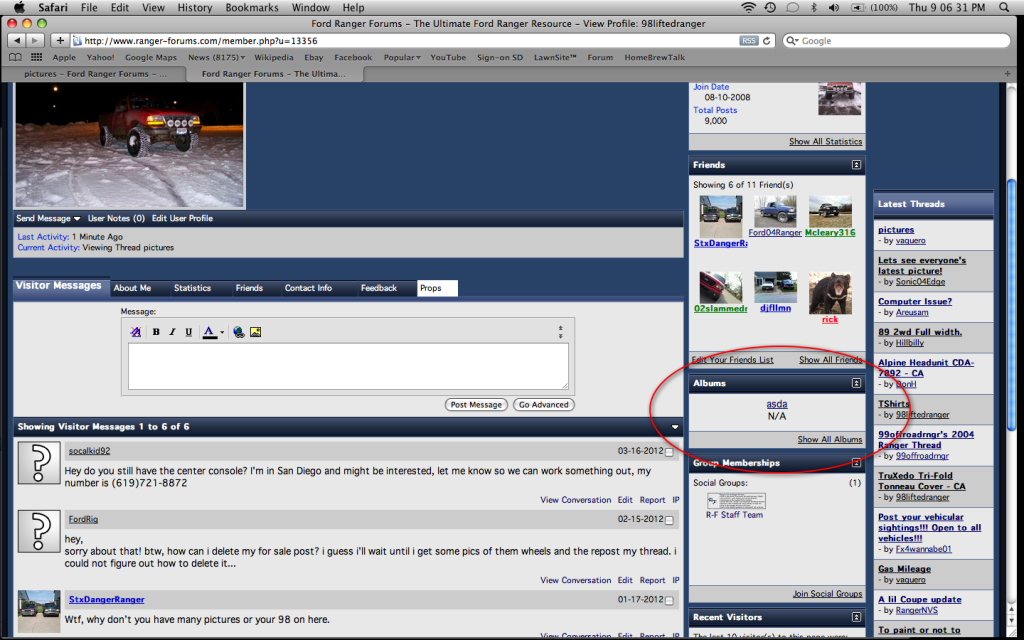
There is no need for multiple threads on the same issue. If you click on your profile and look down to Albums there is a button that says Add Album. Click that and it will prompt you on how to create an Album. When that is created it will bring you to a page that says Upload Pictures. Click that and upload.
Thread Starter
|
Member

Joined: May 2012
Posts: 46
Likes: 0
From: everett, wa
ok tried again this morning every time i go to my profile it reads as follows:
Not Found
The requested document was not found on this server.
--------------------------------------------------------------------------------
Web Server at forumediainc.com
Please contact us with the url where you received this error.
please help
Not Found
The requested document was not found on this server.
--------------------------------------------------------------------------------
Web Server at forumediainc.com
Please contact us with the url where you received this error.
please help

ok tried again this morning every time i go to my profile it reads as follows:
Not Found
The requested document was not found on this server.
--------------------------------------------------------------------------------
Web Server at forumediainc.com
Please contact us with the url where you received this error.
please help
Not Found
The requested document was not found on this server.
--------------------------------------------------------------------------------
Web Server at forumediainc.com
Please contact us with the url where you received this error.
please help
Member
Joined: Apr 2008
Posts: 560
Likes: 2
From: Chicago, Ill
After you type in Tread or Reply,
Click on (Go Advanced)
Scroll the page up till you find ( Additional Options)
In that box click on ( Manage Attachments) Another window will open and the click on (Choose Files), I usually store the pictures on my desk top first. My desk top file opens and then I select a picture from it. I had to set my cameras pixel size to its lowest setting. My pictures were all ways to big to up load. Click on one of the (Up File ) tabs then I click on (Choose) picture. The jpeg will appear next to the tab I selected and then I click the ( Down Load ) tab and wait...
Good Luck
Click on (Go Advanced)
Scroll the page up till you find ( Additional Options)
In that box click on ( Manage Attachments) Another window will open and the click on (Choose Files), I usually store the pictures on my desk top first. My desk top file opens and then I select a picture from it. I had to set my cameras pixel size to its lowest setting. My pictures were all ways to big to up load. Click on one of the (Up File ) tabs then I click on (Choose) picture. The jpeg will appear next to the tab I selected and then I click the ( Down Load ) tab and wait...
Good Luck
Last edited by Jrevans2002; May 18, 2012 at 02:58 PM.

Thread
Thread Starter
Forum
Replies
Last Post


